Note
Go to the end to download the full example code.
Sine bell and squared Sine bell window multiplication
In this example, we use sine bell or squared sine bell window multiplication to apodize a NMR signal in the time domain.
Requires the official spectrochempy-nmr plugin.
Install with: pip install spectrochempy[nmr].
import spectrochempy as scp

path = "nmrdata/bruker/tests/nmr/topspin_1d"
dataset1D = scp.nmr.read(path, expno=1, remove_digital_filter=True)
dataset1D
Normalize the dataset values and reduce the time domain
dataset1D /= dataset1D.real.data.max()  # normalize
dataset1D = dataset1D[0.0:15000.0]
Apply Sine bell window apodization with parameter ssb=2, which correspond to a cosine function
this is equivalent to
or also
Apply Sine bell window apodization with parameter ssb=2, which correspond to a sine function
Apply Squared Sine bell window apodization with parameter ssb=1 and ssb=2
Apply shifted Sine bell window apodization with parameter ssb=8 (mixed sine/cosine window)
Plotting
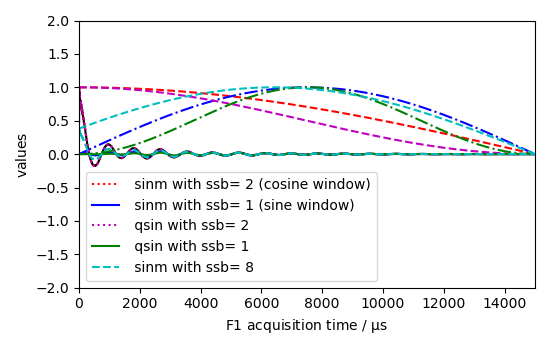
Compare sine bell windows on a first figure.
ax = dataset1D.real.plot(color="k", label="original FID", xlim=(0, 15000))
_ = curve1.plot(clear=False, color="r", ls="--", label="window, sinm ssb = 2")
_ = new1.real.plot(
    clear=False,
    color="r",
    label="apodized FID, sinm ssb = 2 (cosine window)",
)
_ = curve2.plot(clear=False, color="b", ls="--", label="window, sinm ssb = 1")
_ = new2.real.plot(
    clear=False,
    color="b",
    label="apodized FID, sinm ssb = 1 (sine window)",
)
_ = ax.legend()
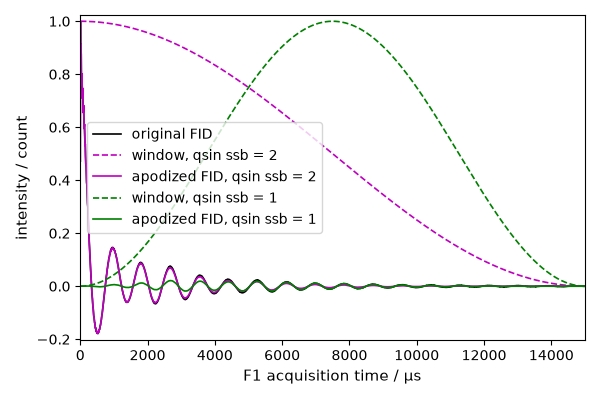
Compare squared sine windows on a second figure.
ax = dataset1D.real.plot(color="k", label="original FID", xlim=(0, 15000))
_ = curve3.plot(clear=False, color="m", ls="--", label="window, qsin ssb = 2")
_ = new3.real.plot(clear=False, color="m", label="apodized FID, qsin ssb = 2")
_ = curve4.plot(clear=False, color="g", ls="--", label="window, qsin ssb = 1")
_ = new4.real.plot(clear=False, color="g", label="apodized FID, qsin ssb = 1")
_ = ax.legend()
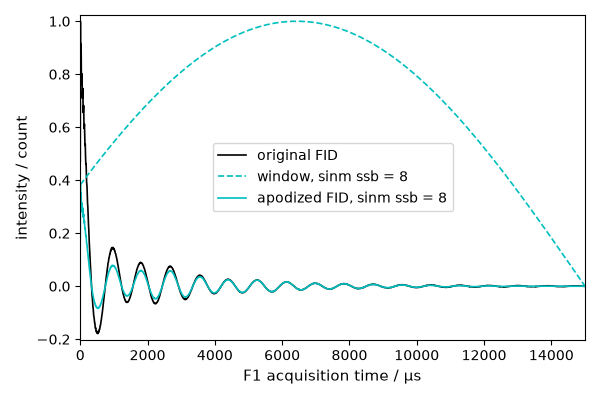
Mixed sine/cosine windows are easier to inspect separately.
ax = dataset1D.real.plot(color="k", label="original FID", xlim=(0, 15000))
_ = curve5.plot(clear=False, color="c", ls="--", label="window, sinm ssb = 8")
_ = new5.real.plot(
    clear=False,
    color="c",
    label="apodized FID, sinm ssb = 8",
)
_ = ax.legend()
Uncomment the following line to display all figures when running the script directly with Python.
# scp.show()
Total running time of the script: (0 minutes 0.913 seconds)