spectrochempy.read_wire#
- read_wire(*paths, **kwargs)[source]#
Open Renishaw Wire files.
This is the explicit WiRE reader in the public import API. Use
spectrochempy.readfor generic format autodetection andscp.wire.read(...)orspectrochempy.read_wirewhen the WiRE format is already known.Non-merged multi-file reads may return a list-like
ScpObjectListexposing helper methods for dataset selection. Seespectrochempy.readfor the complete description of the generic import convention and multi-object return behavior.- Parameters:
*paths (
str,Pathobject objects or valid urls, optional) – The data source(s) can be specified by the name or a list of name for the file(s) to be loaded:e.g., ( filename1, filename2, …, kwargs )
If the list of filenames are enclosed into brackets:
e.g., ( [filename1, filename2, …], kwargs )
The returned datasets are merged to form a single dataset, except if
mergeis set toFalse.**kwargs (keyword parameters, optional) – See Other Parameters.
- Returns:
object (
NDDatasetorScpObjectListofNDDataset) – The returned dataset(s). When several datasets are returned, the result is a list-likeScpObjectListwith helper attributes such as.names,.select_largest(),.select_by_name(),.filter_by_ndim(), and.filter_by_shape().- Other Parameters:
content (
bytesobject, optional) – Instead of passing a filename for further reading, a bytes content can be directly provided as bytes objects. The most convenient way is to use a dictionary. This feature is particularly useful for a web application to handle drag and drop of files into a Browser.description (
str, optional) – A custom description.directory (
Pathobject objects or valid urls, optional) – From where to read the files.download_only (
bool, optional, default:False) – Used only when url are specified. If True, only downloading and saving of the files is performed, with no attempt to read their content.merge (
bool, optional, default:False) – IfTrueand several filenames or adirectoryhave been provided as arguments, then a singleNDDatasetwith merged dataset (stacked along the first dimension) is returned. In the case not all datasets have compatible dimensions or types/origins, then several NDDatasets can be returned for different groups of compatible datasets.origin (str, optional) – If provided it may be used to define the type of experiment: e.g., ‘ir’, ‘raman’,.. or the origin of the data, e.g., ‘omnic’, ‘opus’, … It is often provided by the reader automatically, but can be set manually.
It is used, for instance, when reading a directory with different types of files and merging compatible datasets into separate groups by origin.
pattern (
str, optional) – A pattern to filter the files to read.Added in version 0.7.2.
read_only (
bool, optional, default:True) – Used only when url are specified. If True, saving of the files is performed in the current directory, or in the directory specified by the directory parameter.recursive (
bool, optional, default:False) – Read also in subfolders.replace_existing (
bool, optional, default:False) – Used only when url are specified. By default, existing files are not replaced so not downloaded.sortbydate (
bool, optional, default:True) – Sort multiple filename by acquisition date.
See also
readGeneric reader inferring protocol from the filename extension.
spectrochempy.read_zipRead Zip archives (containing spectrochempy readable files)
spectrochempy.read_dirRead an entire directory.
spectrochempy.read_opusRead OPUS spectra.
spectrochempy.read_labspecRead Raman LABSPEC spectra (
.txt).spectrochempy.read_omnicRead Omnic spectra (
.spa,.spg,.srs).spectrochempy.read_socRead Surface Optics Corps. files (
.ddr,.hdror.sdr).spectrochempy.read_spcRead Galactic files (
.spc).spectrochempy.read_quaderaRead a Pfeiffer Vacuum’s QUADERA mass spectrometer software file.
spectrochempy.read_csvRead CSV files (
.csv).spectrochempy.read_matlabRead Matlab files (
.mat,.dso).spectrochempy.read_jcampRead Infrared JCAMP-DX files (
.jdx,.dx).
Examples
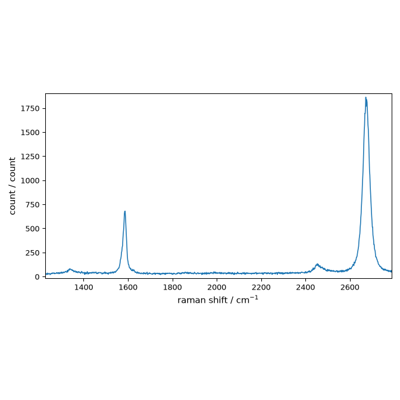
Reading a single Wire file
>>> scp.read_wire('irdata/wire/white_light.wdf')
NDDataset: [float64] a.u. (shape: (y:1, x:261))
Using the explicit namespace API
>>> scp.wire.read('irdata/wire/white_light.wdf')
NDDataset: [float64] a.u. (shape: (y:1, x:261))