Note
Go to the end to download the full example code.
Reading a PerkinElmer SP file (plugin)
This example shows how to read a PerkinElmer .sp binary IR file using the
optional spectrochempy-perkinelmer plugin.
Hint
Requires the official ``spectrochempy-perkinelmer`` plugin.
Install with: pip install spectrochempy[perkinelmer].
import spectrochempy as scp
Read the sample PerkinElmer file
The PerkinElmer reader is available through the namespaced API
scp.perkinelmer. A single-spectrum .sp file is loaded as an
NDDataset with wavelength coordinates and available metadata.
datadir = scp.preferences.datadir
filename = datadir / "irdata" / "perkinelmer" / "spectra.sp"

dataset = scp.perkinelmer.read(filename)
Display the dataset summary:
The dataset preserves available metadata from the PerkinElmer file:
print(f"Instrument model: {dataset.meta.instrument_model}")
print(f"Detector:        {dataset.meta.detector}")
print(f"Source:          {dataset.meta.source}")
print(f"Analyst:         {dataset.meta.analyst}")
print(f"Date:            {dataset.meta.date}")
print(f"Accumulations:   {dataset.meta.accumulations}")
Instrument model: Spectrum One
Detector:        MCT
Source:          MIR
Analyst:         None
Date:            Thu Mar 09 09:17:56 2006
Accumulations:   32
Plot the spectrum:
_ = dataset.plot()
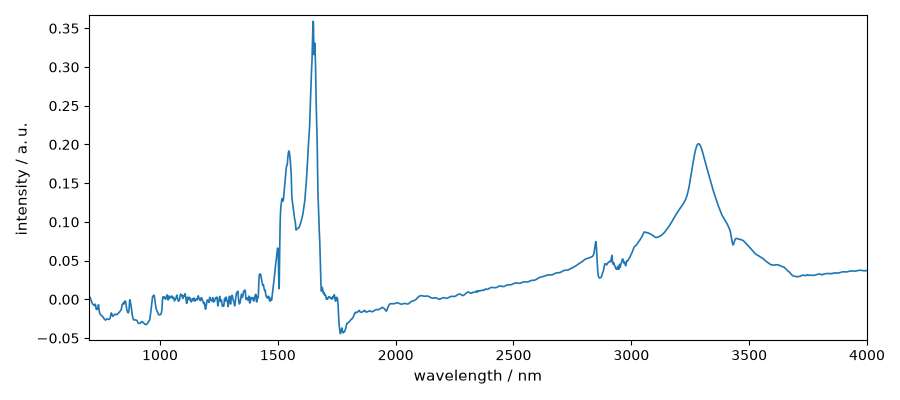
Use the plotted spectrum as the gallery thumbnail. sphinx_gallery_thumbnail_number = 1
This ends the example ! The following line can be removed or commented
when the example is run as a notebook (ipynb).
# scp.show()
Total running time of the script: (0 minutes 0.129 seconds)